Point it at folders
Add the directories you already have, including a synced library. There is no cloud sign-in.
 LeakSift
Local-first scanner
LeakSift reads folders on your computer and reports PII, financial data, secrets, passwords, and intellectual property. The scan stays local. Optional AI triage only looks at snippets a local rule already flagged.
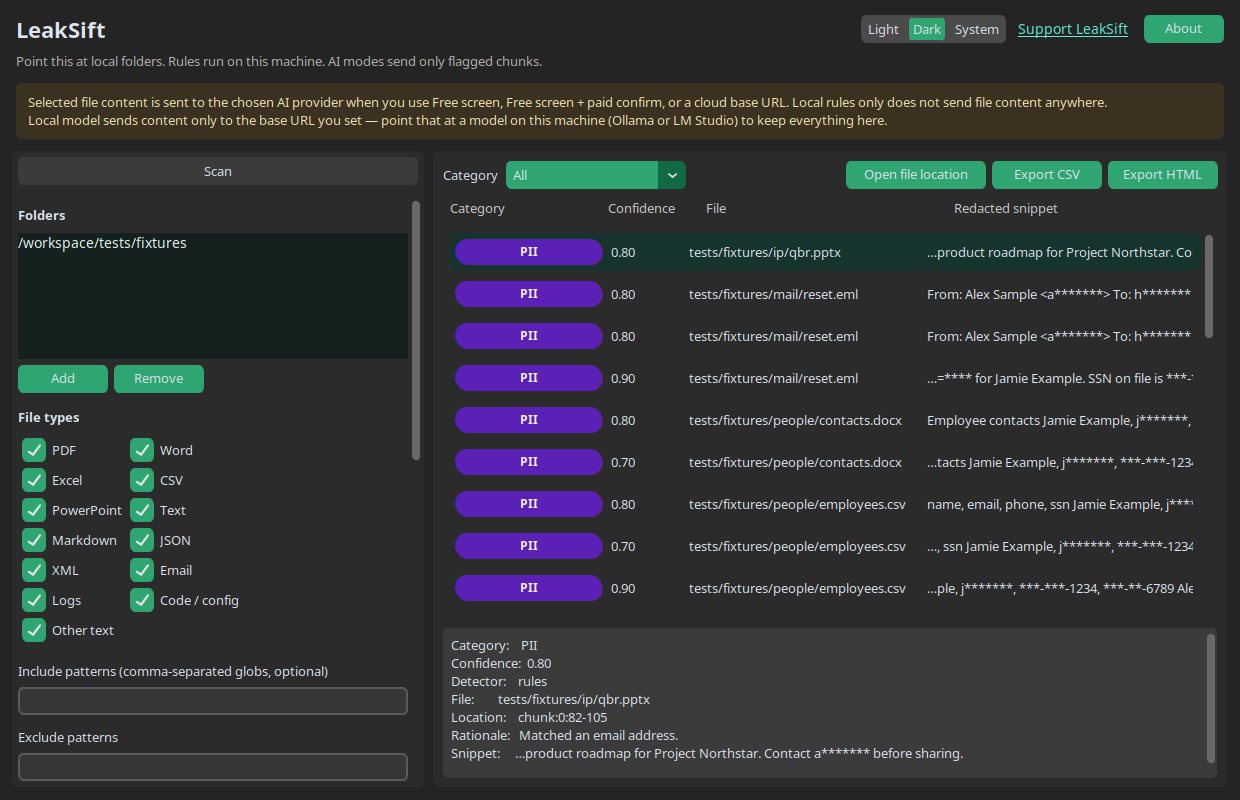
LeakSift does not upload the folders you choose. Local rules run entirely here. If you turn on an AI mode, only the short excerpts that already matched a local pattern are sent to the provider you picked. Point the local-model mode at Ollama or LM Studio and those excerpts stay on your network too.
Add the directories you already have, including a synced library. There is no cloud sign-in.
Patterns for cards, IDs, keys, passwords, and confidentiality marks run on this computer before any model is involved.
A free screen, a paid confirm, or a local model can review only those flagged snippets. Rules-only mode sends nothing.
Yes. LeakSift is a free tool. Donations are not open yet.
No. The files stay on your computer. AI modes send only redacted, already-flagged snippets, and only if you enable them. Local rules only does not send file content anywhere.
The download is unsigned until an Apple Developer ID is added to the build. Gatekeeper will block the first open. In Finder, right-click LeakSift.app, choose Open, then Open again. You can also clear the quarantine flag in Terminal: xattr -dr com.apple.quarantine LeakSift.app. Drag the app from the disk image into Applications first.
SmartScreen shows that for unsigned installers. Choose More info, then Run anyway. The setup adds a Start menu shortcut, a desktop shortcut, and an uninstaller.
PII, financial numbers, secrets, passwords, and intellectual-property markings such as confidentiality banners. A document with none of those local patterns is not sent to a model.